Industrial Product Catalogues: Organising Complex Product Ranges for Buyers
How to design industrial catalogues around buyer navigation, product families, technical comparison and consistent product data.
A manufacturer can have excellent individual datasheets and still have a difficult catalogue. The challenge appears when the product range grows: families overlap, variant codes multiply, product pages use different terminology and distributors need to identify the right model quickly.
A catalogue is therefore not simply a collection of brochures. It is an information architecture for product selection. Its job is to help someone move from a need or application to a manageable group of options, and then to the detailed data required for validation.
Understand how different people enter the range
A service engineer may begin with an existing part reference. A designer may start from dimensions, capacity or interface requirements. A purchaser may know the application but not the product family. A distributor may work with an internal category name that the customer has never heard.
Observe which routes are important before designing an index. A catalogue organised exclusively around company divisions can be logical internally while leaving the reader to guess which division serves their application. Conversely, organising only by application can hide technical differences between similar products. A good system often offers more than one path into the same source of product information.
Three useful navigation models
Family-led architecture groups a range by construction or product type. It is efficient for users who already recognise the families, particularly when model variation occurs within a consistent mechanical platform. Application-led architecture starts with the job a product performs and is useful for earlier-stage buyers; it requires careful rules when the same product serves several applications. Parameter-led navigation begins with selection requirements such as size, interface type or operating range; it works best where a limited set of validated criteria reliably narrows the choices.
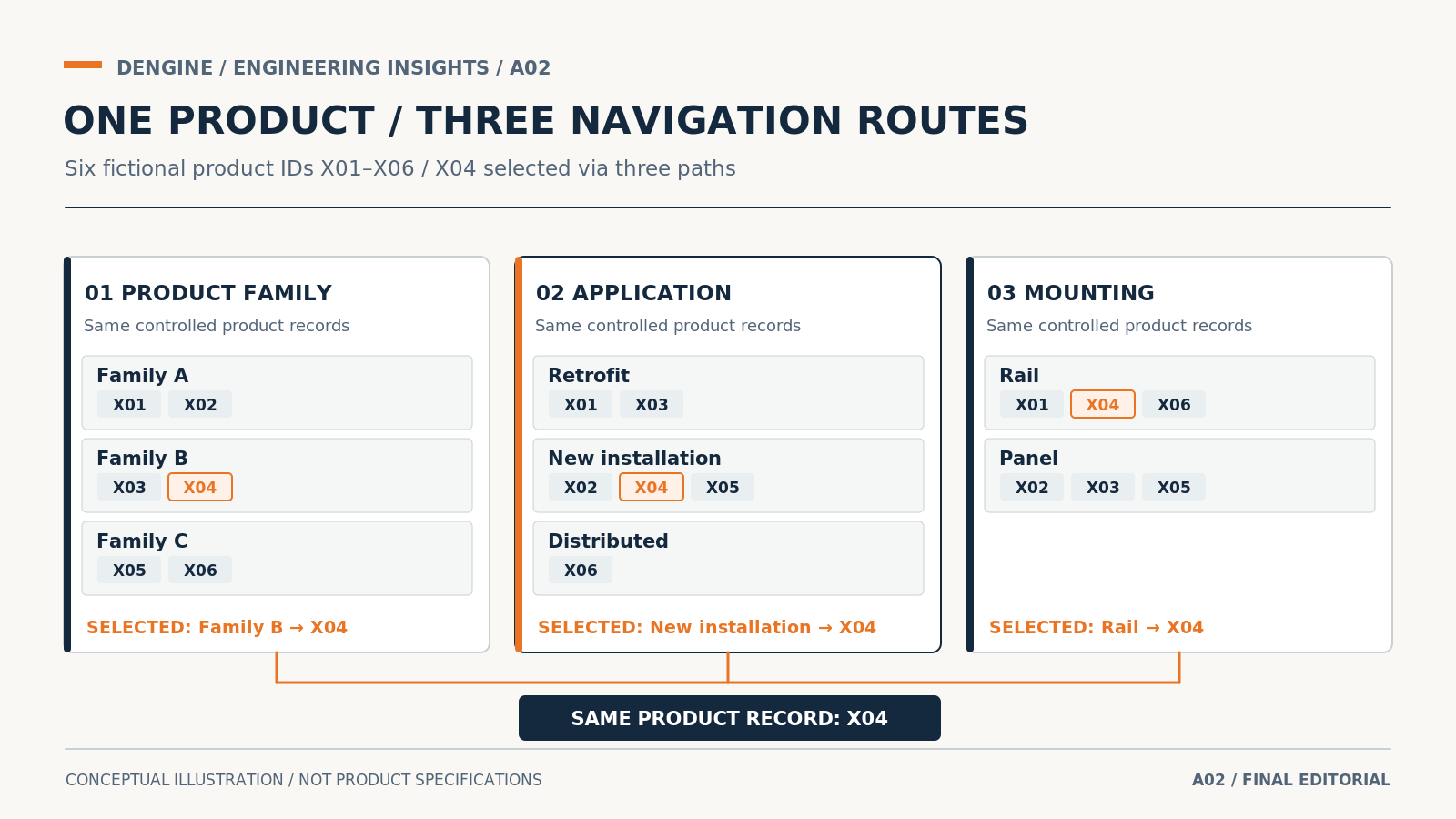
Consider a fictional six-model range with stable identifiers X01–X06. In the family-led route, Family A lists X01 and X02; Family B lists X03 and X04; Family C lists X05 and X06. In the application-led route, Retrofit leads to X01 and X03; New Installation leads to X02, X04 and X05; Distributed leads to X06. In a mounting-led route, Rail leads to X01, X04 and X06, while Panel leads to X02, X03 and X05. All properties and assignments here are invented for explaining information architecture, not actual compatibility claims.
The important point is that the product ID remains stable whichever route the buyer chooses. One route mirrors the manufacturer's engineering families, another mirrors an application question, and another narrows by a technical filter. A real catalogue may let one model appear under several applications; such relationships must come from validated product metadata and must not generate competing versions of its specifications. Choose the primary entry route by what target buyers know at the start, with other routes as cross-references rather than disconnected catalogues.
Design a reusable product-page pattern
Once a reader reaches a product, the page should behave predictably. Put identification, purpose, key configuration features, selection data, visual explanation, interfaces, compatible accessories and relevant document references in recognisable positions. Repetition is an advantage when it reduces the learning effort between pages.
However, identical page layouts should not force false equivalence. A component with five critical operating limits may deserve a larger technical table than an enclosure whose main purchase constraints are dimensions and ingress characteristics. Standardise the information categories and graphic logic, not the amount of empty space assigned to every family.
Make variants and exceptions visible
Ranges become confusing when a catalogue presents one standard model prominently and buries options in small notes. Define what a model number encodes, which values change with configuration, and whether an accessory is included, available separately or incompatible with a given variant.
A comparison table is useful when several models can be assessed against the same decision criteria. If the product range requires more complex logic, provide a selection sequence or configurator alongside the catalogue. Do not force every difference into a single table with dozens of unreadable columns.
Plan for updates before layout approval
Treat product information as managed content. Each item should have an owner and controlled source, and each change should be traceable to a model, a parameter or a document revision. Stable product IDs are especially important when brochures, PDFs, distributor sheets and web pages are produced by different teams. A practical minimum record can contain model ID, approved display name, family, validated application tags, selection parameters, source document, revision and owner. A public catalogue should not create its own alternative values for these fields.
Print, downloadable PDF and online catalogue may share data but differ in how readers navigate. In print, a strong index and page references matter. In a PDF, internal bookmarks and live cross-references can reduce searching. On a website, filters and structured product pages may make comparison easier, provided they do not detach values from their units and conditions.
A practical catalogue architecture review
Test a proposed catalogue using representative buyer tasks before deciding on navigation. Task one: give someone an approved part code and ask them to reach the correct model page. Task two: provide a typical application without the family name and observe the route taken. Task three: give two real selection constraints and ask the participant to reduce the candidates, then open the full datasheet. Record wrong turns, duplicate product pages, unexplained labels and missing links; do not infer performance improvements from this fictional example. If participants get stuck, review the taxonomy or filter labels with product specialists rather than adding more categories indiscriminately.
A catalogue becomes useful when routes, product representation and controlled technical data form a coherent system. DENGINE's work on industrial sales materials can help manufacturers decide how to organise product families and how that logic should appear across catalogue pages and specifications. The appropriate starting point is to inspect the range, its existing data sources and the selection decisions buyers must make.


